Quick Start#
Importing#
First, one needs to import SHAnC using:
import shanc
In order to try the package out, one might want to use the data files provided with the package as examples:
import shanc.examples
Helix Object#
SHAnC uses object oriented programming, and as such, the “helix” objects are defined in SHAnC.
One can simply create an helix using the following command:
helix = shanc.helix()
This helix is empty and contains no information. So as an example we will create a silica helix with the following parameters :
pitch : 100 Å
width : 30 Å
thickness : 20 Å
diameter : 60 Å
turns : 1
One should note that, as the systems are by default periodic, one should only do 1 turn.
In order to do that, one can use the following script:
file_lattice = shanc.examples.SiO2

pitch = 100.
width = 30.
thickness = 20.
diameter = 60.
turns = 1

helix = shanc.helix(pitch=pitch,width=width,thickness=thickness,diameter=diameter,turns=turns,file_lattice=file_lattice)
Helix Creation and Visualisation#
Now that the parameters have been set, one can create the helix using the homonymous method create_helix:
helix.create_helix()
This will create a new file, “helix.data” (the generated name can be changed by using the keywords of the function). This file is a data file that can be loaded through LAMMPS which contains all the information necessary to do the dynamics.
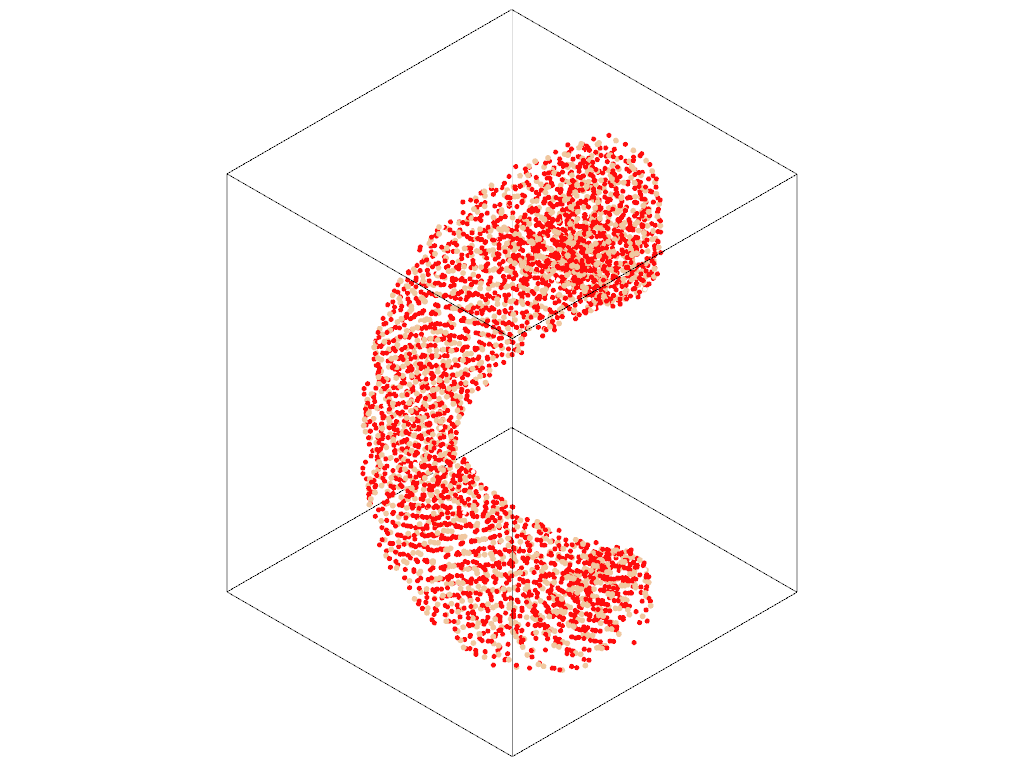
Before doing the dynamic, it is recommended to visualise what has been produced by the code. To do that one can use the method plot_structure:
helix.plot_structure()
Summary#
The following code should produce the “helix.data” file and the generated structure should look like this.
import shanc
import shanc.examples

file_lattice = shanc.examples.SiO2
pitch = 100.
width = 30.
thickness = 20.
diameter = 60.
turns = 1

helix = shanc.helix(pitch=pitch,width=width,thickness=thickness,diameter=diameter,turns=turns,file_lattice=file_lattice)
helix.create_helix()
helix.plot_structure()